Building a butai client#
A complete, self-contained brief for building a GUI client against the butai daemon. It covers the architecture, every way to reach the daemon, the full wire + HTTP command reference, the JSON data model, live updates, connection code, and a UI storyboard (one frame per screen and state). You should be able to build a working client from this document alone — you do not need the butai source, only a reachable daemon.
It was written to specify the macOS app, so the connection samples are in Swift (§7) and the storyboard is drawn for a desktop window. Neither is a requirement: the API is plain HTTP + JSON on a Unix socket, and every part of it is reachable from any language. Read §7 as a worked example, not a mandate.
Prefer the terse version?
protocol.mdis the normative spec — same surface, no tutorial, no UI. This document is the guided tour.
The mockups follow this project's UI policy: ASCII only, no emoji (terminal width and taste), one frame per screen and state.
0. TL;DR#
- butai is a terminal-multiplexer daemon (like tmux) plus a v2 "agent workbench" UI. One daemon per user owns all state.
- It exposes two protocols on one Unix socket: 1. a framed streaming protocol (JSON length-prefixed) — needed only if you want to render live terminal screens; 2. an HTTP/REST API (Docker-socket style) that serves structured JSON — agents, processes, git changes, system gauges — and accepts actions.
- Use the HTTP API (Section 4) and render the structured data natively. Drop
to the framed protocol (Section 9) only for the actual scrolling terminal of an
agent or process. This is not GUI-specific advice: it is what
web/, the macOS and iOS apps and the bundled TUI all do, because a terminal's screen is the one thing the daemon can tell you that JSON cannot. - Socket path:
~/.butai/butai.sock(overrideBUTAI_SOCKET). - Auth is filesystem: whoever can open the socket is trusted. Remote access is over SSH/Tailscale (Section 2.3).
1. Mental model#
There is one long-running daemon. It owns everything real: the PTYs
(terminals), the agent processes, git status, the system telemetry sampler.
Every UI — the built-in TUI, butai ls, your app — is a thin client that
holds almost no state and asks the daemon.
The daemon does two different jobs, and it is important to keep them separate:
- Job 1 — streaming (terminals). The daemon runs the terminals and renders each client's whole screen into a grid of cells, streaming damage diffs forever. Clients are "dumb monitors". This is why detach/reattach and SSH work. You only need this if you want to show a live terminal.
- Job 2 — control (structured API). Ordinary request/response: "list workspaces", "spawn an agent", "what are the system gauges". This is the HTTP API and is what a native GUI mostly wants.
A workspace (a.k.a. session) is one project = one daemon session. Each workspace has three "rails" of structured state and one "stage":
- AGENTS — long-running AI/agent terminals, each with an attention state:
waiting[?](asked a question / wants input),working[~](recent output),finished[v](turn done, your move),idle[ ]. - PROCESSES — managed processes (dev servers, builds, shells) with a status:
ok,run,done,FAIL(<code>),...(busy). - CHANGES — git status for the workspace: branch, staged/unstaged files with diffstat, recent commits.
- SYSTEM — machine gauges: CPU %/temp, RAM, per-GPU util+VRAM, docker containers.
- STAGE — the single large area showing "the current thing" (an agent terminal, a process log, a file, or a diff). In the HTTP API you don't render the stage's contents (that's Job 1); you drive which pane is staged only via the framed protocol. For a first client, treat the stage as "open this agent's terminal" using Section 9, or skip it.
2. Reaching the daemon#
2.1 Local socket#
- Default path:
~/.butai/butai.sock, alongside everything else butai stores (config, themes, logs, session state). Override with theBUTAI_SOCKETenvironment variable. Home-relative on purpose:$XDG_RUNTIME_DIRis set for a login shell but routinely absent from a non-interactivessh host butai ..., so a path derived from it moved between the two and a remote client would spawn a second, empty daemon instead of attaching to the running one. - It is a
SOCK_STREAMAF_UNIXsocket. Both protocols share it. - Auth = the socket directory's
0700permissions. There is no token.
2.2 Is a daemon running?#
The daemon is started on demand by the butai CLI, or headless with
butai daemon. If the socket file exists and accepts a connection, it's up.
Note: the daemon chmod 700s the socket's parent directory, so a custom
BUTAI_SOCKET must live in a directory the user owns (not bare /tmp).
2.3 Remote access (Mac talking to a Linux host)#
The daemon never listens on TCP. Three supported ways in:
-
Forward the socket over SSH (works great with Tailscale):
sh
   ssh -N -L /tmp/butai-remote.sock:/home/user/.butai/butai.sock user@host
Now your client talks to the local/tmp/butai-remote.sockexactly as if it were local. This is the recommended path against a remote host. -
ssh host butai proxybridges stdio to the socket (the framed protocol only; for HTTP prefer socket forwarding). -
Local HTTP bridge / TCP forward. If you want plain TCP for URLSession, forward the HTTP over the socket to a localhost port. Either: -
socat TCP-LISTEN:7420,reuseaddr,fork UNIX-CONNECT:/path/butai.sockthen hithttp://127.0.0.1:7420/v1/...; or - the reference container inweb/which mounts the socket and re-serves it on a port (see Section 8's note). Over Tailscale this gives youhttp://<tailscale-ip>:8080.
For a clean native app, socket forwarding (2.3.1) + AF_UNIX HTTP (Section 7) is the least moving parts.
Since 0.6 the TUI does not need any of this to reach another machine: the
daemon is a client of other daemons, and their workspaces appear as tabs in
the local tab bar (Alt-h / the machines button, or a [[remote]] block in
~/.butai/config.toml). It dials them by exactly the mechanisms above — option 2
for an ssh destination, option 1 for a socket you have already forwarded. That
matters to you as a client author only in one way: a daemon may now be relaying
frames it did not draw, and nothing about the frames says so. There is no new
client-side work; see the fleet for how it fits
together.
3. Choosing a protocol#
| You want to… | Use |
|---|---|
| List/inspect workspaces, agents, processes, git, system | HTTP API (§4) |
| Spawn/kill agents, start/restart processes, stage/commit git | HTTP API (§4) |
| Get live push updates of state changes | SSE /v1/events (§6) |
| Render the actual scrolling terminal of an agent/process | Framed protocol (§9) |
| Send keystrokes into a terminal | Framed protocol (§9) |
Build the app on the HTTP API first. Add the framed terminal view later if you want the stage.
4. HTTP API reference (/v1)#
HTTP/1.1 spoken directly on the socket. A connection is treated as HTTP when its
first byte is an ASCII method letter (a framed hello starts with 0x00). All
bodies are JSON. Content-Type application/json.
Conventions:
- Queries (GET) return the DTO (Section 5).
- Actions return {"ok":true} (200), {"id":<n>} (201 create), or
{"error":"..."} with status 400 (bad request), 404 (missing), 500 (internal).
- Send Accept-Encoding: gzip. JSON replies over 1 KiB and the event stream
come back gzipped; ask for nothing and you get the uncompressed bytes. Almost
every HTTP client does this for you and decodes it transparently — URLSession,
browsers, Bun's fetch, requests, curl --compressed. It costs nothing
locally and saves most of the connection over ssh, because /v1/system is the
biggest thing here and compresses better than 6:1. See
Compression for the exact rules.
4.1 Queries#
| Method | Path | Returns |
|---|---|---|
| GET | /v1/workspaces |
[WorkspaceSummary] |
| GET | /v1/workspaces/{id} |
WorkspaceDetail |
| GET | /v1/workspaces/{id}/agents |
[AgentDto] |
| GET | /v1/workspaces/{id}/processes |
[ProcessDto] |
| GET | /v1/workspaces/{id}/changes |
ChangesDto (404 if not a git repo) |
| GET | /v1/system |
SysDto |
| GET | /v1/agents |
[string] (configured agent type names) |
| GET | /v1/usage |
UsageDto — every configured CLI's account standing |
| GET | /v1/events |
SSE stream (Section 6) |
4.2 Actions#
| Method | Path | Body | Effect |
|---|---|---|---|
| POST | /v1/workspaces |
{"name"?:string,"layout"?:string} |
create → 201 {"id"} |
| DELETE | /v1/workspaces/{id} |
— | kill workspace |
| POST | /v1/workspaces/{id}/agents |
{"type":string} (alias name/agent) |
spawn an agent of that configured type |
| POST | /v1/workspaces/{id}/processes |
{"name":string,"command":string} |
start a managed process |
| POST | /v1/workspaces/{id}/processes/{pane}/restart |
— | restart that process |
| DELETE | /v1/workspaces/{id}/processes/{pane} |
— | remove that process pane |
| POST | /v1/workspaces/{id}/changes/stage |
{"path":string} |
stage one file |
| POST | /v1/workspaces/{id}/changes/unstage |
{"path":string} |
unstage one file |
| POST | /v1/workspaces/{id}/changes/commit |
{"message":string} |
commit the index |
| POST | /v1/workspaces/{id}/changes/commit-all |
{"message":string} |
stage every change, then commit (400 if nothing to commit) |
| DELETE | /v1/workspaces/{id}/file?path= |
— | delete one file. Ask the user first — see below |
{id} is a workspace id (integer). {pane} is a pane id (integer) from the
pane field of an AgentDto/ProcessDto.
DELETE …/file is the one action here that destroys something git cannot give
back, so it is the one your client must not fire from a bare keypress. The path
is a query parameter rather than a body — it pairs with GET …/file?path= and
POST …/upload?path= — and the daemon refuses the two shapes that would make it
bigger than one file: a directory is a 400, not a recursive removal, and a path
that climbs out of the workspace with .. is a 400 before anything is touched.
A file that is already gone is a 404, which is worth surfacing rather than
swallowing: it means your listing was stale and something else deleted it.
4.3 curl examples#
S=~/.butai/butai.sock                      # or your forwarded socket

curl --unix-socket $S http://localhost/v1/workspaces
curl --unix-socket $S http://localhost/v1/workspaces/1
curl --unix-socket $S http://localhost/v1/system

curl --unix-socket $S -X POST http://localhost/v1/workspaces -d '{"name":"demo"}'
curl --unix-socket $S -X POST http://localhost/v1/workspaces/1/agents \
     -H 'content-type: application/json' -d '{"type":"claude"}'
curl --unix-socket $S -X POST http://localhost/v1/workspaces/1/changes/stage \
     -d '{"path":"src/main.rs"}'
curl --unix-socket $S -X POST http://localhost/v1/workspaces/1/changes/commit \
     -d '{"message":"wip"}'
curl --unix-socket $S -X POST http://localhost/v1/workspaces/1/changes/commit-all \
     -d '{"message":"wip"}'   # stages every change first, then commits

curl --unix-socket $S -X DELETE \
     'http://localhost/v1/workspaces/1/file?path=notes.txt'   # gone, not recoverable

curl -N --unix-socket $S http://localhost/v1/events    # live stream
5. Data model (JSON schemas)#
Field names are exact. All numbers are JSON numbers; floats where noted.
In TypeScript, do not copy these by hand.
web/app/src/protocol/generated/protocol.tsis all 77 types — the REST DTOs and the framed protocol's message set — generated from the Rust with ts-rs and checked in. The daemon's own doc comments come with them, so the prose below appears on hover in your editor.
ts
import type { WorkspaceDetail, AgentDto, ServerMsg } from "./protocol/generated/protocol";
It is generated by
cargo test -p butai-protocol --features ts, and CI fails if what is committed is not what that writes — so a DTO that grows a field cannot quietly leave a client behind. Never edit the file; regenerate it.Two things it encodes that are easy to get wrong by hand.
u64fields are typednumber, notbigint, because they arrive throughJSON.parseand none is near 2^53. And a field is optional in TypeScript exactly when serde may omit it —#[serde(default)]alone still always serializes, so only the cell-run fields carryingskip_serializing_ifbecome?.
// GET /v1/workspaces  -> [WorkspaceSummary]
WorkspaceSummary {
  "id": 1,
  "name": "demo",
  "cwd": "/home/me/project",
  "agents": 2,          // counts
  "processes": 3,
  "changes": 16,        // number of changed files (staged+unstaged)
  "attached_clients": 1 // TUI/GUI viewers currently attached
}

// GET /v1/workspaces/{id}  -> WorkspaceDetail
WorkspaceDetail {
  "id": 1,
  "name": "demo",
  "cwd": "/home/me/project",
  "agents": [AgentDto],
  "processes": [ProcessDto],
  "changes": ChangesDto | null   // null when not a git repo
}

AgentDto {
  "pane": 7,                       // pane id (use for framed stage / future kill)
  "title": "claude",               // live title; may include " [exited]"/" [exited N]"
  "state": "waiting" | "working" | "finished" | "idle" | "exited",
  "exited": null | 0,              // exit code once the process exits, else null
  "question": false,               // a decision prompt is on screen (subset of "waiting")
  "started_ms": 1754900000000,     // unix ms the process started; run the clock yourself
  "working_since_ms": null,        // unix ms the current turn began, null when not working
  "unread": false                  // reached "finished"/"exited" and not looked at since
}

ProcessDto {
  "pane": 4,
  "name": "web",
  "command": "npm run dev",
  "status": "ok" | "run" | "done" | "..." | "FAIL(1)",
  "exited": null | 0
}

ChangesDto {
  "branch": "main",
  "staged":   [FileChange],
  "unstaged": [FileChange],
  "recent_commits": [ { "id": "a1b2c3d", "summary": "message" } ]
}
FileChange { "path": "src/main.rs", "code": "M", "added": 12, "deleted": 3 }
// code is the git status char: M A ? D R T ! (worktree) / A M D R T (index)

// GET /v1/system  -> SysDto
SysDto {
  "cpu_pct": 12.5,                 // float 0..100
  "cpu_temp": 58.1 | null,         // celsius, float, nullable
  "cpu_model": "8-core x86  "|null,// already shortened by the daemon
  "cpu_cores": 8 | null,           // physical
  "cpu_threads": 16 | null,        // scheduler-visible
  "ram_used_gb": 9.2,              // float
  "ram_total_gb": 78.5,            // float
  "swap_used_gb": 1.9,             // float; 0/0 means no swap configured
  "swap_total_gb": 3.7,            // float
  "gpus": [ { "pct": 40.0, "mem_used_gb": 12.0, "mem_total_gb": 24.0,
              "name": "RTX A5000", "temp_c": 53.0, "power_w": 52.3 } ],
  "net": [ { "name": "enp1s0", "kind": "wired", "carrier": true,
             "default_route": true, "rx_bps": 70123.0, "tx_bps": 98450.0,
             "rx_hist": [ ... ], "tx_hist": [ ... ],
             "speed_mbps": 1000 | null, "driver": "r8169" | null } ],
  "disks": [ { "mount": "/work     ", "source": "/dev/nvme0n1p1",
               "fstype": "ext4", "kind": "local",
               "used_gb": 898.7, "total_gb": 915.8, "stale": false } ],
  "containers": [ { "name": "ollama", "state": "running" } ]
}
net is every interface the machine has, unfiltered, with kind one of
wired, wireless, loopback, bridge, veth, vpn, other. Which of them
counts as "the network" is the client's decision, not the daemon's — but note
that bridge and veth bytes are counted again on whatever interface they
egress from, so summing them double-counts, and loopback never leaves the box.
Those three kinds carry no rx_hist/tx_hist: on a docker host with 36
interfaces that history was 31 KB of a 39 KB payload, resent every two seconds.
Their live rates are still published, so a client that wants a trend for a bridge
can accumulate its own.
disks is every mount that has a capacity to report, largest first, with
kind one of local, network, memory, layer, other. Same contract as
net: which of them counts as "the disk" is yours to decide. The pseudo
filesystems (proc, sysfs, cgroup, devpts) are absent, and that is not an
opinion — they have no capacity, so there is no number to publish.
On macOS the list is shorter than mount prints, on purpose. An Apple
silicon machine boots with eight or nine filesystems mounted and all but / are
MNT_DONTBROWSE — /System/Volumes/VM, Preboot, Update, Data and the
rest — so the daemon drops them the way Finder does. What is left is deduplicated
by APFS container rather than by volume, because an APFS volume has no size of
its own: every volume in a container reports the container's total and the
container's free space, so / and /System/Volumes/Data are one 460 GiB disk
counted twice. / is the row that survives its container. Expect one entry for
the boot disk, plus whatever is mounted under /Volumes.
The row is therefore the container's fullness under the root volume's name,
and the two df invocations disagree about it: df -h / reports 9% because the
sealed system volume is small by design, and df -h /System/Volumes/Data reports
72% because that is where the space goes. used_gb matches the second. If you
surface a "compare with df" hint anywhere, point it at the data volume.
Three things to know before you draw it. used_gb is total minus available,
not minus free, so it can exceed what df's "Used" column says: the blocks a
filesystem reserves for root are not space a build can have, and df's percent
agrees with this one. The _gb are GiB, as everywhere else on this struct —
divide by 1024, not 1000, if you scale up to terabytes, or your number will
disagree with df -h on the same disk. And there is no history: a filesystem
does not visibly move across the window, so a trace would be a flat line at 320
bytes per mount per push. Draw a bar, not a sparkline.
stale means the capacity call did not come back in time and these are the last
good numbers — or zeros, if there never were any. A statvfs on a mount whose
server has gone away blocks uninterruptibly, so the daemon gives its sweep a
deadline and rests a mount that misses it. It is reported rather than dropped
because a row that vanished reads as a filesystem somebody unmounted, which is a
different fact about the machine. Draw it as out-of-date rather than as an alarm:
99% full and a minute old is news about the clock.
The _hist arrays are oldest-first, one sample per tick, ~80 deep. History is
the daemon's to keep because it is the only thing awake often enough to sample;
a client that buffers its own gets a trend that starts when it attached and
disagrees with every other client's.
Throughput needs a floor when you draw it: an interface that is up is never at zero — keepalives, mDNS and ARP keep a few hundred bytes a second moving — so autoscaling alone will paint an idle link as a busy one. The TUI treats anything under 4 KiB/s as silence.
State → glyph mapping for the UI:
waiting → [?] (red/urgent), working → [~] (yellow), finished → [v]
(blue/your move), idle → [ ] (dim).
unread is the second axis, and it is what separates "a turn landed while you
were away" from "a turn you read an hour ago" — finished holds until the agent
works again, so on its own it cannot tell you. The daemon sets it on the edges
into finished/exited and clears it when the pane is looked at: streaming it,
watching it, sending it input, or POST .../panes/{pane}/ack. So a client that
opens a pane already marks it read, and one that dismisses from a list should
ack. Render unread at full strength and read at dim — and leave waiting alone,
which never carries unread, because an unanswered question is urgent however
many times you have read it.
Process status colors: ok→green, run→blue, ...→yellow, done→dim,
FAIL(n)→red.
6. Live updates — SSE GET /v1/events#
text/event-stream. Each record is data: <json>\n\n:
data: {"event":"system","data": SysDto }
data: {"event":"workspaces","data": [WorkspaceSummary] }
data: {"event":"workspace_detail","data": WorkspaceDetail }
system and workspaces are pushed roughly every ~2s (the daemon's sampler
tick) and whenever state changes. Consume them to keep gauges and rail counts
live without polling.
workspace_detail (added after 0.6) carries one workspace's full rail
contents — the same body as GET /v1/workspaces/{id}, with agents,
processes and changes — so a client that draws those rails as its own UI does
not have to poll for them. It differs from the two above in cadence and in
filtering, both deliberately:
- it is pushed on the frame clock, not the sampler tick, because a client rendering a rail beside a live pane cannot be a second or two behind it;
- it is pushed only when the detail actually changed. Pane output marks the workbench dirty on nearly every frame while leaving every rail identical, so an unfiltered push would be a full snapshot per workspace per frame — fine on a Unix socket, ruinous over ssh. Two identical details are never sent in a row.
Unknown event tags must be ignored, as always — that is what let this one be added without a version bump.
Older clients need no changes: /v1/workspaces/{id} still answers, and polling
it on a 1–2s timer remains correct, just late. If you are writing a new client
that renders rails, prefer the event.
macOS note: URLSession streaming works for SSE. A 1–1.5s poll of
/v1/workspaces + /v1/system is still the simplest thing that works, and is
what the reference web dashboard does; it is only insufficient if you are drawing
per-workspace rails yourself.
Ask for Accept-Encoding: gzip on this one especially. The stream is ~98%
system telemetry, and gzipped it measured 9× smaller over a 20-second window —
the single biggest saving available to a remote client. It is compressed
incrementally with a flush per record, so nothing arrives later than it did
before, but your decoder has to be a streaming one; URLSession and every
browser's EventSource already are.
7. Connecting — worked example (Swift)#
The samples below are Swift because this section was written for the macOS
client. The shape is language-agnostic: dial the Unix socket, speak HTTP/1.1,
decode JSON. Substitute your own stack freely — examples/api-client.py in the
repo root is the same thing in ~100 lines of stdlib Python.
7.1 Over a forwarded/local Unix socket (recommended)#
macOS URLSession cannot dial an AF_UNIX socket directly. Two clean options:
Option A — tiny raw-socket HTTP client (no deps). Connect a POSIX socket to
the path, write an HTTP/1.1 request with Connection: close, read to EOF, split
on \r\n\r\n. This is ~40 lines of Swift and is exactly what the Python
reference bridge does. Sketch:
import Foundation

func butaiRequest(socketPath: String, method: String, path: String, body: Data? = nil) -> (Int, Data) {
    let fd = socket(AF_UNIX, SOCK_STREAM, 0)
    var addr = sockaddr_un(); addr.sun_family = sa_family_t(AF_UNIX)
    _ = socketPath.withCString { p in strncpy(&addr.sun_path.0, p, MemoryLayout.size(ofValue: addr.sun_path) - 1) }
    let len = socklen_t(MemoryLayout<sockaddr_un>.size)
    _ = withUnsafePointer(to: &addr) { $0.withMemoryRebound(to: sockaddr.self, capacity: 1) { connect(fd, $0, len) } }
    let payload = body ?? Data()
    let head = "\(method) \(path) HTTP/1.1\r\nHost: butai\r\nConnection: close\r\nContent-Type: application/json\r\nContent-Length: \(payload.count)\r\n\r\n"
    var out = Data(head.utf8); out.append(payload)
    out.withUnsafeBytes { _ = write(fd, $0.baseAddress, out.count) }
    var raw = Data(); var buf = [UInt8](repeating: 0, count: 65536)
    while true { let n = read(fd, &buf, buf.count); if n <= 0 { break }; raw.append(buf, count: n) }
    close(fd)
    // split headers/body, parse status from the first line ("HTTP/1.1 200 OK")
    // ... return (status, bodyData)
    return (0, raw)
}
Then JSONDecoder the body into Codable structs mirroring Section 5.
Option B — forward to TCP and use URLSession normally. Run
socat TCP-LISTEN:7420,reuseaddr,fork UNIX-CONNECT:<socket> (locally, or on the
remote via SSH) and point URLSession at http://127.0.0.1:7420/v1/.... Least
Swift code; one extra process.
7.2 Codable structs#
Define Codable structs exactly matching Section 5 (snake_case → use
.convertFromSnakeCase or CodingKeys). state is best modeled as an enum
{ waiting, working, finished, idle } decoded from the snake_case strings.
8. UI behavior#
Group workspaces, agents, processes, changes, and the optional terminal stage so users can find each one. The captures below show the bundled terminal client; your client can use its own layout. Keep status labels readable without relying on color alone.
Launch and connection errors#
If no daemon is reachable, show the socket path and offer Retry and Change socket. For a remote socket, link to your SSH connection setup.
Workspace overview#
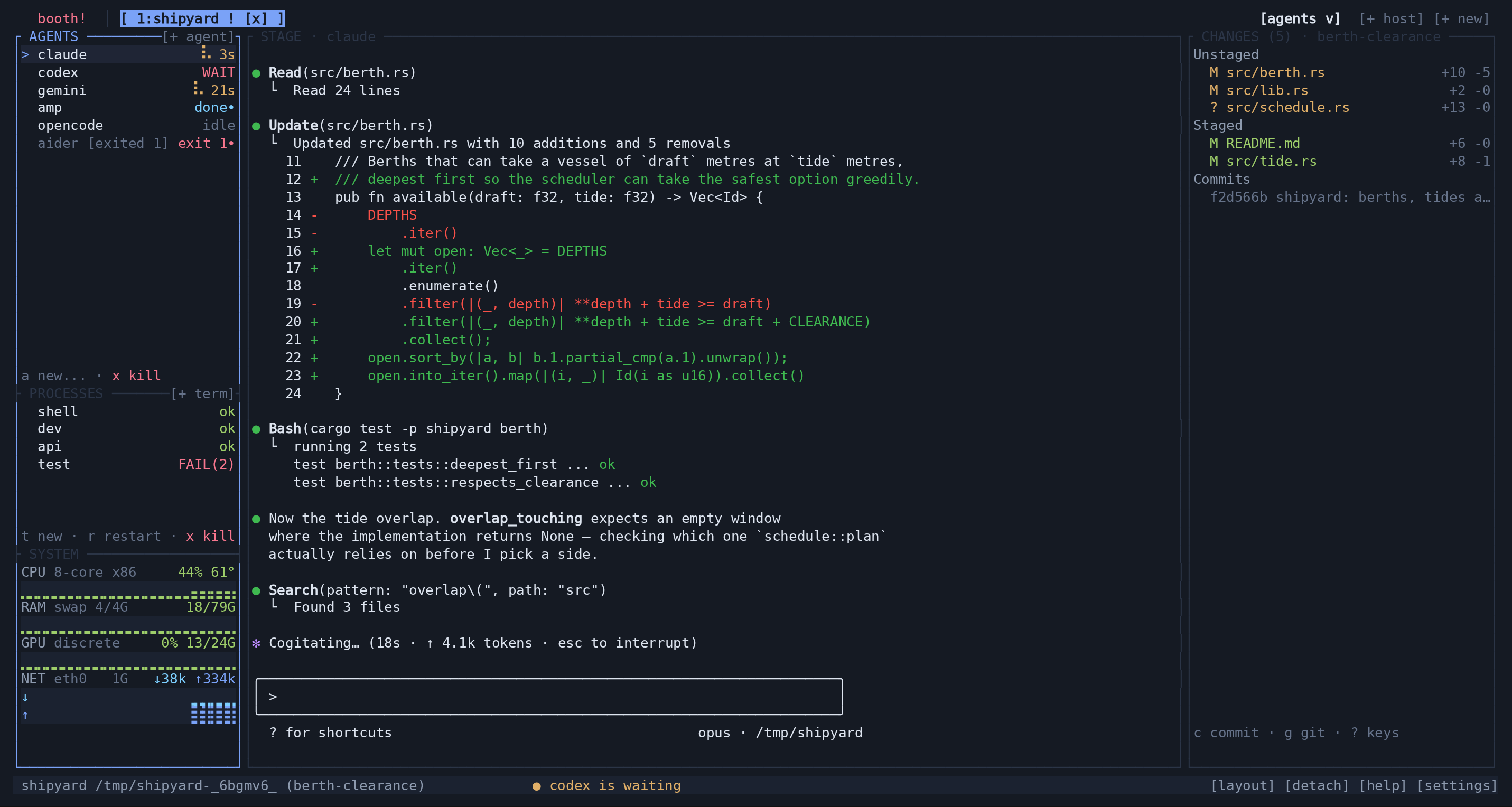
- Left sidebar: workspace list (
GET /v1/workspaces),+ newopens the workspace creation form. - SYSTEM block (sidebar footer): from
/v1/system/ SSE, one gauge per metric. - Center:
GET /v1/workspaces/{id}, three rails stacked. Poll every ~1.5s or refresh on aworkspacesSSE event.
Agents and attention states#
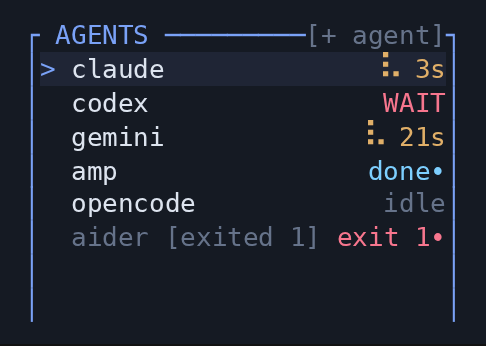
- Selecting a row opens that agent's terminal on the stage (using the framed protocol) or, in a v1 app, just select it.
+ Spawn agent→ dropdown ofGET /v1/agents→POST /v1/workspaces/{id}/agents {"type": <chosen>}.- Exited agents keep showing until dismissed;
DELETE /v1/workspaces/{id}/processes/{pane}is only for processes — there is no agent-kill endpoint yet, so for agents either leave them or reserve a "dismiss" affordance for a future endpoint.
Processes#
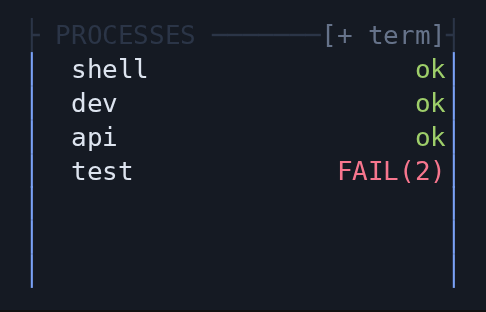
+ Start process→ form (name, command) →POST /v1/workspaces/{id}/processes.- Restart →
POST /v1/workspaces/{id}/processes/{pane}/restart. - Remove →
DELETE /v1/workspaces/{id}/processes/{pane}. - Use the process statuses described in Section 5.
Changes and commits#
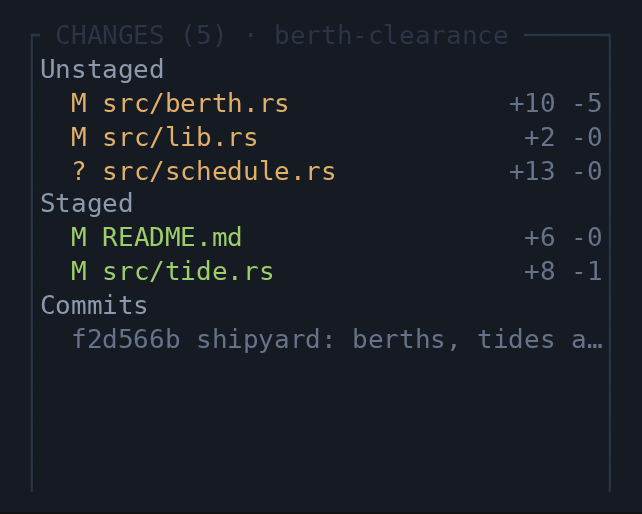
GET /v1/workspaces/{id}/changes. Rows showcode path +added -deleted.- Stage/Unstage per row →
.../changes/stage|/unstagewith{"path"}. Use the exactpathstring from the DTO (repo-relative). - Commit →
.../changes/commit {"message"}; refuse empty message client-side (server also 400s). - Commit all →
.../changes/commit-all {"message"}stages every change first, then commits — the API analog of the CHANGES rail'sCshortcut. 400 when there is nothing to commit. - Discard →
.../changes/discard {"path"}. Destructive and unrecoverable: confirm first, and note it refuses a staged file until you unstage it. changesalso carriesupstream,ahead,behindandstate. Showing↑2↓1beside the branch is the cheapest useful thing a git UI can do.conflictedis a separate list fromunstaged. Do not merge them: a file listed there is half-applied, and offering "stage" on it means offering to commit<<<<<<<markers. Give it its own section and its own verbs (.../git/resolvewithours/theirs/resolved), and whenstate != "clean"show what is in progress plus a way to.../git/sequence {"action":"continue"|"abort"}out of it.
Remote sync#
Show the branch, upstream, ahead/behind counts, and Fetch, Pull, and Push actions. Display progress while an operation is running.
Every POST .../git/* answers either 200 with the finished operation
or 202 with one still running. Handle both — which you get depends only on
whether it beat a short grace window, so the same call varies run to run:
const first = await post(`/workspaces/${id}/git/push`, {});
let op = first;                            // 200: already finished
while (op.running) {                       // 202: poll, or watch the SSE event
  await sleep(300);
  op = await get(`/workspaces/${id}/git/op`);
}
if (!op.ok) showError(op.summary);         // a rejected push is a 200, not a 4xx
ok:false on a 200 is not a contradiction: the request succeeded and is
telling you the operation failed. There is no status code left to carry that
once an operation outlives its request, so the outcome always lives in the body.
A second operation on the same repository answers 409 — one writer at a time,
keyed by worktree root. DELETE .../git/op cancels the running one.
Terminal stage (optional)#
Open the selected agent or process in a terminal stage. Give users a way to return to the overview without stopping the underlying program.
- This is the only screen needing Job 1. Open a second connection to the
socket, hello with a viewport, receive cell frames, paint a monospaced grid,
send keystrokes as
input. See Section 9. A v1 app can omit this entirely and still be fully useful.
New workspace#
Offer a workspace name and Create and Cancel actions. Only offer folder selection if the daemon API supports it, as described below.
POST /v1/workspaces {"name"}. Note: the daemon creates the workspace in the daemon process's current directory; a per-folder create is not yet in the API, so treat "Folder" as informational for now (or omit it) unless the daemon is extended.
System detail (optional)#
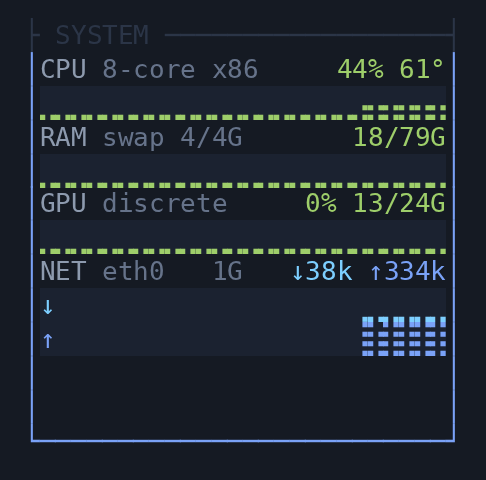
- Read metrics from
SysDto. Label values and units, and handle unavailable metrics without showing a misleading zero.
Empty / error states#
| State | What to show |
|---|---|
| No workspaces | An explanation and a New workspace action |
| No Git repository | A message in the changes panel |
| Action failed | The error returned by the API, next to the action or in a notification |
Suggested SwiftUI mapping#
NavigationSplitView { sidebar: workspaces + system } content: { rails } detail: { stage }.- One
@Observablestore polling/v1/workspaces+/v1/systemon a 1.5s timer (or SSE). Each rail is aList/Section. Actions areButtons calling the client from Section 7 and then invalidating the store. - Model
state/statusas enums for exhaustive coloring.
9. Framed protocol quickstart (only for the live terminal stage)#
Same socket. First message must be a JSON, 4-byte big-endian length-prefixed
hello; the encoding field selects JSON or msgpack for subsequent frames
(use "json").
// client -> server (first frame, always JSON)
{"hello":{"proto_version":1,"encoding":"json","cols":120,"rows":40,
          "target":{"pane":{"pane":7}},"cwd":"/"}}
// target options: {"pane":{"pane":N}}  <- the only one that sends frames
//                 {"attach":{"name"}} | {"new":{"name":null,"layout":null}}
//                 | "default" | "control"   (workspace-scoped, no frames)
Use {"pane":{"pane":N}}. It is the only target that streams: the daemon
renders a terminal's screen and nothing else, so there is no whole-workbench
picture for a session target to send. Get the pane id from
GET /v1/workspaces/{id} (stage, or any agent/process row) and draw the rest
of your UI from Section 4's REST calls.
Server replies with a JSON hello, then streams {"frame":{...}} messages: a
full flag + runs of styled cells at (x,y) + a cursor, covering that one
pane full-bleed at the cols/rows you declared. You paint those into a
monospaced grid, and you put the cursor where cursor says: the daemon parsed
away the escape sequences that move one, so a client that drops the field draws
a shell with no caret in it. Send input as:
{"input":{"key":{"code":{"char":"x"},"mods":{"ctrl":true}}}}
{"input":{"paste":"text"}}
{"resize":{"cols":100,"rows":30}}
{"watch":{"pane":9}}
{"detach":null}
watch re-points the connection at a different pane without reconnecting — what
you want when the user picks another agent, since tearing down and redialling is
a visible stall on any link with latency. You get a full frame for the new
pane, so clear the grid before applying it.
Do not clear the grid when the connection ends. You will get
{"detached":{"reason":"..."}} and then a close, or on a link that died just the
close. Only "server shutting down" and a bare end-of-stream mean the daemon
went — the pane is almost certainly still running, and blanking the screen tells
the user their agent died when it did not. Keep the last frame, mark it as old,
and reconnect on a timer. Every other reason ("pane closed", "workspace
closed", "detached", …) does mean there is nothing to show. The table is in
protocol.md.
Key codes: {"char":"a"}, "enter", "esc", "backspace", "tab",
"left"/"right"/"up"/"down", "home"/"end", "page_up"/"page_down",
"delete", "insert", {"f":5}. Mods: {"ctrl","alt","shift"} (all optional).
Control commands (also usable from a "control" framed client) are snake-cased,
e.g. {"command":{"spawn_agent":"claude"}}, {"command":{"list_sessions":null}}.
Full framing details and the complete command list are in
protocol.md.
Pasting an image costs you one message. Take the bytes off the platform clipboard (or a drop, or a photo picker) and send
{"command":{"put_file":{"name":"clipboard.png","data":"<base64>"}}}
The daemon writes the file outside the project and pastes its absolute path into
the pane, which is what an agent CLI wants; it answers {"file_put":{"path":…}}
so you can say where it went. You do not need a filesystem on the client, or a
second connection, or the REST API — which is the point, because on a remote
host a TUI has one ssh channel and a phone has none. See
protocol.md
for the limits.
If your client can read a clipboard, handle "read_clipboard_image" too.
It is what the daemon sends when the user triggers paste_image (Alt-v, C-b v,
:paste-image, or a button you add) — the daemon cannot read a clipboard that
may be a continent away, so it asks. Reply with the put_file above, or with
{"notice":"no image on the clipboard"} if there isn't one — notice comes
back to you as the daemon's own errors do, so a client-side failure lands
wherever you already show those. Ignoring the request entirely is also valid for
a client with nothing to read.
Recommendation: one framed connection for the stage, attached with
{"pane":…} and re-pointed with watch as the user changes what they are
looking at. Everything else in the app is the HTTP API.
10. Gotchas / pre-flight checklist#
- Socket path is
~/.butai/butai.sock; make it configurable. - Remote: forward the socket over SSH (Tailscale) rather than expecting TCP.
- Custom
BUTAI_SOCKETmust be in a user-owned dir (daemon chmod-700's the parent) — relevant if you spawn a daemon yourself. - HTTP: send
Content-Type: application/json; useConnection: closefor the simple raw-socket client and read to EOF. -
changesisnullfor non-git workspaces — handle it. -
exitednon-null means the agent/process is dead; show the code, don't treat it as live. - Stage/commit paths must be the exact repo-relative
pathfrom the DTO. -
DELETE .../processes/{pane}is for process panes; there is no agent-kill endpoint yet. - Poll
/v1/workspaces+/v1/systemevery ~1.5s, or consume/v1/events(SSE) forsystem,workspaces,notificationandgit_oppushes. Ignore event tags you do not recognise — the set grows, and a client that throws on an unknown one breaks on upgrade. - All the shapes above are stable JSON; unknown fields may be added over time — decode leniently.
The Bun reference bridge lives in web/server/, and the React/TypeScript
client in web/src/. For a smaller standard-library example, see
examples/api-client.py. Build and run instructions are in
development.md.